How do I know if my software supports payment initiation with Ponto?
How do I know if my bank supports payment initiation with Ponto?
You can verify this information by finding your bank on our bank reach page.
How do I request the activation of the payment service in Ponto?
Access your Ponto dashboard and select the Accounts menu on the left-hand side. Click on your bank account, then open the Payments tab. You will be asked to provide additional details about your organization’s legal representatives and beneficial owners.
Payment signing will only be enabled in Ponto once our team has verified your organization’s details using official sources. This process may take several days. You will receive an email once the activation process is complete.
How do I create payments in Ponto?
How do I sign a payment?
We offer a facility to initiate the payment signature process directly from your software. We invite you to check with your software provider to see if they have implemented this facility. Alternatively, you must log into your Ponto dashboard to sign the payments created by your software in Ponto.
Important remark: your payment is moved to the history section of your Ponto payments dashboard as soon as you have been redirected to the bank sign it. It is not possible to sign again a failed payment from Ponto if this payment was moved to the history section of your Ponto payments dashboard. You must recreate the payment from your software.
My payment failed
In case of failed payment please review the following points before contacting us :
Are you certain that there was enough credit on your bank account to execute the payment?
Did you exceed a daily, weekly, or monthly limit configured in the bank domain?
Isn’t a second signature required in the bank domain? Through another channel than Ponto?
If your previous payments were properly processed by the bank, do you know what the difference is between the failed payment and the successful ones? Did you sign them in the same way? Are you certain that it is a SEPA payment?
What happened during the signature process? Did you receive an error message in the bank domain? In that case your bank should be able to help you.
If you are sure that the payment did not go through, you can try to recreate it from your software. It is not possible to resume the signature process of a failed payment.
What is the status of my payment?
Please note that your bank is not obliged by law to inform Ponto when your payment has been fully executed, and the settlement process is completed. PSD2 requires the banks to provide Ponto with the same information as when you initiate payments through the bank’s direct channels.
The most compelling way to make sure that your payment has been executed is to check your transaction history and balance in your home-banking application, or to contact your bank, if necessary.
However, Ponto checks the status of a signed payment for three days to track updates.
Your payment is moved to the history section of your Ponto payments dashboard as soon as you have been redirected to the bank domain to authenticate this payment.
Here are the possible statuses:
Status | Description |
Accepted | The bank is processing your payment. Check your transaction history in your home-banking application to confirm the execution of your payment, if necessary. |
Pending | The bank has received your payment. If you have already signed it, it should be processed by the bank soon. If the status stays Pending in Ponto, it is possible that something went wrong during the signing of your payment with the bank or additional signatures are required in the bank domain. Please check again later and check your transaction history in your home-banking application to confirm the execution of your payment. If necessary, create this payment again from your software. |
Rejected | |
Unknown | |
Partially accepted | Specific to bulk payments. Several transactions in your bulk payment have been accepted by the bank, whereas other transactions have not yet achieved an “accepted” status. Note that the bank may not inform us when your payment initiation request has been executed. Therefore, we ask you to check again later and check your transaction history to verify the execution of your bulk payment. |
Cancelled | You have cancelled your payment initiation request in the bank domain. |
How can I be sure that my payment has been executed by my bank?
The most compelling way to make sure that your payment has been executed is to check your transaction history in your home-banking or smart-banking application, or to contact your bank.
What are bulk payments?
A bulk payment is a single payment instruction that includes multiple payments that are processed together by your bank. All payments in a bulk have the same ordering account in Ponto. We currently support SEPA bulk payments only. Which means that the currency of your ordering account must be EUR, that the currency of each payment in your bulk must be EUR, and that the creditor account of each payment in your bulk must be a valid IBAN in the SEPA. You can add up to a thousand (1000) single payments in a bulk.
Does Ponto support multi-signature payments?
No not at the moment.
If a second signature is required by your bank to authenticate a payment, the second signature must be applied through one of the direct channels of the bank.
What is “Verification of the beneficiary name”?
Main principle
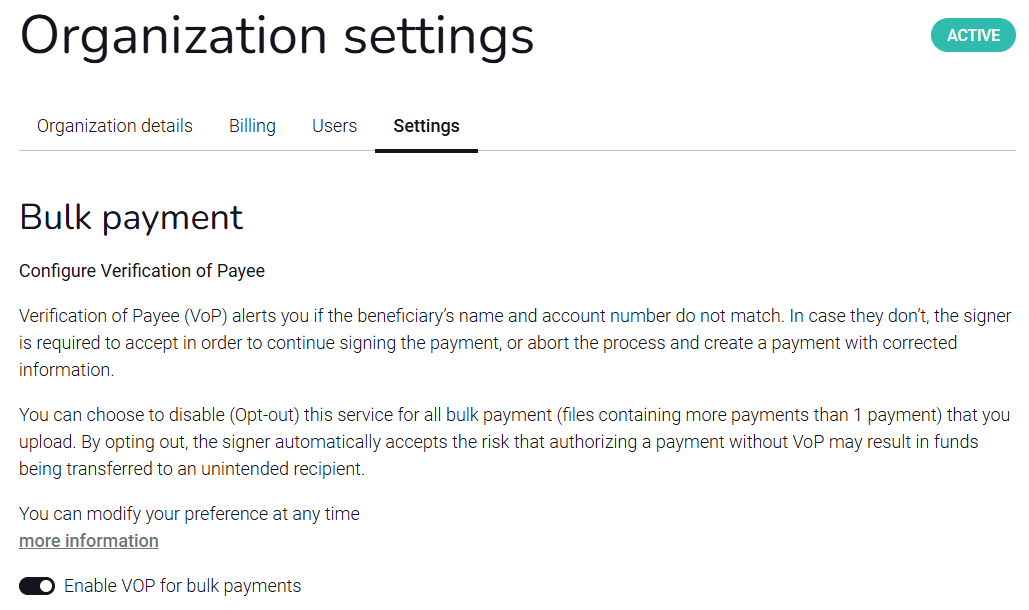
Verification of the beneficiary's name, also known as IBAN name check or Verification of Payee (VoP), is a service that confirms whether the name of the beneficiary, as provided by the payer in a payment instruction, matches the official name associated with the beneficiary account number. This enhances the security of financial transactions by reducing the risk of sending payments to the wrong bank account, whether by mistake or fraud.
For example, this service protects you against:
Invoice fraud if the IBAN on an invoice was changed by a fraudster.
Typing errors in the IBAN or in the beneficiary’s name.
Using outdated payment details when a supplier changed their account without informing you.
Which payments are verified?
All SEPA single and bulk payments by default.
How does Ponto verify the beneficiary's name?
Ponto has partnered with a trusted Routing and Verification Mechanism (RVM) connected to all European banks.
Isabel only shares the minimum information necessary to the verification by the RVM (i.e., the beneficiary account number and name provided in your payment).
What is the result of the verification process?
 In progress: the verification of the beneficiary’s name is still in progress.
  Match: the beneficiary’s name and IBAN correspond. You can proceed with the signature of your payment.
  Partial match: the beneficiary’s name is similar but not identical. A name proposition is sometimes included in the beneficiary bank’s answer. If you wish to use this name proposition, you must abort the process and resend the payment from your software with the new beneficiary name.
  No match – the name does not correspond to the IBAN’s account holder. To submit a new beneficiary name, you must abort the process and resend the payment from your software.
 Unavailable – the beneficiary bank does not support verification of the beneficiary’s name, or the check could not be performed. You can proceed with the signature of your payment at your own risks
 Technical Error - An error occurred that prevented Ponto from verifying the name of the beneficiary. You can proceed with the signature of your payment at your own risks or try again later.
We strongly recommend confirming the payment details with your beneficiary before signing the payment.
Always contact your beneficiary using a trusted communication channel.
Remark: It is not possible to modify the payment details directly in Ponto.
I cannot sign my payment
The signature of the Single or Bulk payment is disabled as long as the verification process is ongoing. This can take a minute for Bulk Payments. The button will be reactivated as soon as the verification is completely done. The page is dynamically updated, you don't need to refresh it.
What should I do when I see a partial match or a no match?
You can chose to continue at your own risks or abort the process to modify the payment details. It is not possible to modify the payment details directly in Ponto. To modify the beneficiary's name you must abort the process and resend the payment from your software.
We strongly recommend confirming the payment details with your beneficiary before signing the payment.
Always contact your beneficiary using a trusted communication channel.
Will my payment be executed if the beneficiary’s name and account number do not match?
Verifying the beneficiary’s name helps you to spot possible errors, but it does not block you during the initiation of your payment. You stay in control and you decide whether Ponto must send your payment to the bank or not.
How long does it take to verify the beneficiary’s name?
The verification process should take a few seconds. If the processing time is longer than expected, you can abort the process and send again the payment from your software. It is not possible to modify the payment details directly in Ponto.
I am certain that my data are correct, but I receive a warning
A “no match” or a “partial match” does not necessarily indicate that the beneficiary’s account number is incorrect. It indicates that the account holder name registered with the beneficiary’s bank does not exactly match the name you provided.
Possible causes:
You used a trading name while the bank only knows the legal name.
There are minor spelling differences or added/omitted words (e.g. “Ltd”, “BV”, “SA”, “Group”).
The beneficiary’s name is generic like in shared or pooled accounts.
When in doubt, contact your counterparty via a trusted communication channel.
Can I opt out of the verification of the beneficiary's name?